

Agents and MCP
BuiltOmniglass serves the Model Context Protocol (MCP), so an AI agent you already use (Claude Code, or
any MCP client) can read your fleet and work in it. The agent drives omniglass through the same API as
the console and the CLI: each MCP tool is one API operation, generated from the API by make gen, and
each call runs with your token, so the agent sees and changes exactly what your permissions and
scope allow (and the install’s agent policy permits) and every change it makes is audited as yours, marked as having arrived over MCP. The
MCP tools reference lists every tool, its gate, and what a client may assume of it.
The design is on the API page.
Sign in from the client
Section titled “Sign in from the client”The quickest way to connect an MCP client that speaks OAuth (Claude Code does) is to add the server with no token and let the client sign you in:
claude mcp add --transport http omniglass https://omniglass.example.com/mcpThe first call is refused with a pointer to the server’s OAuth metadata. The client registers itself (or, if it publishes a client metadata document, names itself by that document’s URL, and the Connect page shows the host serving it), opens your browser on the console’s Connect page, and you choose the roles it may act under (only roles whose capabilities you hold are offered). Approving hands the client a one-time code it exchanges, with its PKCE proof, for an agent token named after the client: accepted on MCP only, holding what the chosen roles and you hold, with the plaintext ceiling below. The token lasts an hour and the client renews it on its own with a refresh token, so you are not asked again while the client is in use. Denying sends the client a refusal and mints nothing. Signing the same client in again replaces its token rather than adding one.
The token shows in your profile’s API tokens as OAuth: <client name>; revoking it there refuses
the client’s next call and ends its refreshes, and everything it did is in the audit log under its
name. A client left unused for 30 days signs you in again.
Give the agent a token of its own
Section titled “Give the agent a token of its own”Where a client does not speak OAuth, or you want to choose the lifetime and channels yourself, mint an agent token for the agent rather than lending it yours. It acts on your behalf, so every change it makes is recorded as yours, taken through that agent:
omniglass auth create-token --description "claude code on my laptop" \ --agent claude-code --ttl-days 30 --roles '["viewer"]' --channels '["mcp"]'--agentnames the agent, fixed at issue. The audit log carries it beside you as the actor, andomniglass audit-log list --agent claude-codelists what it did.--ttl-daysis required for an agent token: it always expires (365 days at most).--rolesnarrows it (optional). It holds what those roles grant and what you hold, checked on every request, so narrowing or removing your own access narrows or stops the agent at its next call. You cannot name a role wider than your own.--channelslimits where it is accepted,api(direct REST and the CLI) ormcp(optional; both when omitted).omnibotis the channelomniglass omnibotmints for its own runs (below).
An agent token can never reveal or copy a secret’s plaintext, whatever its roles: the agent works
with credentials only through the routes that use them server-side (polling an endpoint, issuing a
command), so it knows a credential is present and never what it is. Otherwise it may do what you
may: with secret:bind it can attach an endpoint with a secret input, edit the address, outpost or
secret of an endpoint that has one, create a system from a template that binds a secret, or add a
simulated component that needs one, exactly as you could. Binding chooses where a credential goes, so
decide in your MCP client whether such a tool runs always, asks first, or never (an admin can also
refuse it to every agent: what an agent may do); every write the
agent makes is audited as the agent’s. An agent also never enrolls an outpost, since the enrollment
token is itself an outpost credential. The same ceiling holds for any token, yours included, while it
is used through MCP. An agent token also cannot mint another token, change your password or
impersonate anyone.
The token is printed once; keep it in the agent’s environment, not in a file you commit. Minting and
revoking it each write an audit row: omniglass session list shows it with its agent name, and
omniglass session revoke <id> ends it without touching your own sessions.
Over HTTP
Section titled “Over HTTP”A remote agent connects to /mcp on your server over streamable HTTP, sending a token as a bearer
header (one it got by signing in, or one you minted). The endpoint answers to a token and nothing else (a browser’s signed-in session does not open
it). With Claude Code:
claude mcp add --transport http omniglass https://omniglass.example.com/mcp \ --header "Authorization: Bearer $OMNIGLASS_TOKEN"Any MCP client that takes a JSON server list takes the same three facts:
{ "mcpServers": { "omniglass": { "type": "http", "url": "https://omniglass.example.com/mcp", "headers": { "Authorization": "Bearer ${OMNIGLASS_TOKEN}" } } }}Use https for anything beyond your own machine: the token travels in every request.
Over stdio
Section titled “Over stdio”An agent that launches its MCP servers as local commands runs omniglass mcp, which serves the same
tools over stdio by relaying to the server’s /mcp with the token in its environment:
claude mcp add omniglass \ -e OMNIGLASS_SERVER=https://omniglass.example.com -e OMNIGLASS_TOKEN="$OMNIGLASS_TOKEN" \ -- omniglass mcpThe relay serves exactly the tools the server lists, sends the token only to the server you named, and never follows a redirect elsewhere.
Skills
Section titled “Skills”Tools are what an agent can do; a skill is how to do a whole job with them. The server serves each
skill as an MCP prompt, so it shows up in your client beside the tools: in
Claude Code, type / and pick mcp__omniglass__triage-alarm, then name the component. The agent gets
the workflow (read the alarm, check reachability, find what changed, check what depends on it,
recommend a next step) and works through it with your token, asking before anything that changes the
fleet.
A skill never asks for a credential. When a step needs one, such as a fresh poll or a command, the server runs it with the credentials bound to the endpoint, so the agent never needs one; and if a tool’s answer quotes something that looks like a credential, the skill tells the agent not to repeat it. That is the skill’s discipline, not a filter: what a tool answers is what your token may read.
An agent that reads skill files rather than prompts can take one straight from the binary. The file
is the front matter (name, description, arguments) and then the workflow; the prompt is that same
workflow, after the front matter, with the arguments you gave listed under ## Given:
omniglass mcp skill # the skills, as JSONomniglass mcp skill triage-alarm > .claude/skills/triage-alarm/SKILL.mdTry it from a terminal
Section titled “Try it from a terminal”omniglass mcp tools and omniglass mcp call are a small MCP client over stdio, the same path an agent
takes, which is handy for checking a connection or scripting a tool:
omniglass mcp tools | jq -r '.[] | "\(.name)\tread-only=\(.read_only)"'omniglass mcp call get-component-reachability --args '{"name":"panel-1"}'A tool the route refuses (no permission, a component outside your scope, a bad argument) prints the route’s own error and exits non-zero.
Omnibot, the assistant in the CLI
Section titled “Omnibot, the assistant in the CLI”omniglass omnibot is Omniglass’s own agent. It runs your conversation on the server, on the model the
install is configured with, and prints the run as it happens: the model’s
text, and a line for each tool call. The model’s key stays on the server, so it never reaches your
terminal. Read-only tools run freely; anything else stops to ask you on the terminal
(Run it? [y/N]), and anything but y declines, and the model hears that you declined. With no
terminal to ask, it declines every write. Its writes land in the audit trail as yours, tagged
agent omnibot, on the omnibot channel.
omniglass omnibot "add a panel in the lobby"omnibot: conversation omnibot-3f2a (pick it up with --resume omnibot-3f2a)Given no prompt, omnibot opens a chat: each line you type is a prompt, and each answer continues the
conversation the last one left. /exit or Ctrl-D ends it.
omniglass omnibot--replay <file> runs the loop on your machine instead, on a recorded model (a list of the model’s
turns, its tool calls and its last answer), which is how the tests and the demos drive it. That loop
mints itself a one-day agent token named omnibot, held to the omnibot channel, and revokes it
when the run ends, however it ends (Ctrl-C included); --max-steps bounds it (10 by default).
omniglass omnibot --replay recording.yaml "add a panel in the lobby"Carrying a conversation on
Section titled “Carrying a conversation on”--resume <name> keeps the conversation on the server under that name, yours alone, and carries it
on: a later run with the same name starts where the last one stopped.
omniglass omnibot --resume triage "what is down"omniglass omnibot --resume triageomnibot: conversation triage, 2 messages keptThe name is lowercase kebab, unique among your own conversations; a new name starts one. Nobody else
can read it, an admin or the platform owner included, except through impersonation, which sees what
you see. If the run it was kept from stopped on a write it was waiting to ask you about, the resumed run asks that first (Run it? [y/N]) and carries on from
your answer. omniglass assistant conversation list, get and delete manage them, and a conversation
nobody touches for assistant.conversation_days (30 by default) is deleted.
Running omnibot on the server
Section titled “Running omnibot on the server”The server runs omnibot too, over a conversation it keeps, and streams the run as AG-UI events: the protocol the console, and any AG-UI client, reads. Send the prompt as the run’s last user message:
omniglass assistant conversation create --name lobbyomniglass assistant conversation run lobby --messages '[{"role":"user","content":"tag the meeting 405 video bar with its asset id"}]'The answer is the event stream: RUN_STARTED, the model’s text, each tool call and its result, and
RUN_FINISHED. The run holds an omnibot token of its own, revoked when the stream ends, and
its writes are audited as agent omnibot acting for you, as the CLI’s are. A write your agent policy
asks about ends the run on an interrupt naming the call (outcome.type is interrupt) and keeps it
with the conversation. Answer it with the next run:
omniglass assistant conversation run lobby --resume '[{"interruptId":"call-2","status":"resolved","payload":{"approved":true}}]'{"approved": true} runs the call; false, or a cancelled status, declines it, and the model hears
that you declined. A run that names a call that is not waiting, a new prompt while one waits, or a
run while another still holds the conversation is a 409, so a call the server runs runs once, however
many clients answer it; while a run holds the conversation, an append is a 409 too. A run lasts 30 minutes at most. Only you run your conversations, as yourself: an agent token or an impersonation session is
refused. The server runs omnibot only with a model: the one configured,
else the recording OMNIGLASS_OMNIBOT_REPLAY names, and with neither a run is a 503. The lab’s
server plays one that tags the meeting 405 video bar, so the commands above run there as written.
A recording for the server can hold conversations beside its turns, each a match (text its message
must contain) or a prompt (the question it answers) and turns of its own. A run plays the first
conversation whose match its message contains, else the top-level turns, and counts its turns from that
message, so each prompt in a conversation starts a script of its own.
A recording that names a top-level prompt answers only the prompts it names (#2443): its top-level
turns answer that prompt, each conversation with a prompt answers its own, and a conversation with
only a match (the skill runs) answers what it matches. A prompt matches however it is cased or
punctuated. Any other message is a 422 of type urn:omniglass:omnibot-replay-unmatched, “This lab
plays a recording; connect a model to ask your own question”, before the conversation is claimed or
touched, so a recording never plays an unrelated run. GET /assistant/conversations says which
applies: its omnibot object has a mode (live, replay or none) and, for a replay, the
prompts, and nothing of a configured model. A recording with no top-level prompt plays its turns
for any message, as before.
The lab’s recording triages the video bar’s alarm for a triage-alarm skill run, matching
the skill’s heading:
turns: - tool_calls: [{name: get-component, arguments: {name: 'hq.west.level-4.meeting-405.$comp.videobar-1'}}] # ...conversations: - match: "# Triage an alarm" turns: - tool_calls: [{name: list-component-alarms, arguments: {name: 'hq.west.level-4.meeting-405.$comp.videobar-1'}}] - text: The meeting 405 video bar's alarm is still active ...A recorded turn can also carry think, how long the model works before the turn arrives (a duration
such as 1.8s, at most 30s), and reasoning, the thinking the console shows above it. Without them a
recording answers at once; the lab’s corporate recording uses both, so a capture of the console paces
like a live model.
A run can carry what you are looking at as AG-UI context: references, a kind and a name or address,
never a value (#2122). omnibot reads them as data ahead of your message and looks each up with its
tools, under your grants. At most 20 entries, each value at most 2000 characters:
omniglass assistant conversation run lobby \ --context '[{"description":"alarm","value":"hq.lobby.mic-1/icmp-unreachable"}]' \ --messages '[{"role":"user","content":"why is this raised?"}]'A run can also name one of the server’s skills in forwardedProps in place of a message;
the server renders the skill’s own prompt from its arguments, so a client never composes skill text.
An unknown skill, or one missing an argument it requires, is a 422:
omniglass assistant conversation run lobby --messages '[]' \ --forwardedProps '{"skill":{"name":"triage-alarm","arguments":{"component":"hq.lobby.mic-1"}}}'Pointing omnibot at a model
Section titled “Pointing omnibot at a model”omnibot’s model is an install setting, the assistant namespace, set by an admin. One adapter speaks
the OpenAI-compatible chat completions API, so it reaches OpenRouter (the default), OpenAI, or a
model you run yourself (Ollama, vLLM, LM Studio) by its base URL. Store the key as a platform secret
of type api-key, then name it:
omniglass secret create --name models-key --owner-kind platform --secret-type api-key \ --fields "{\"key\":\"$OPENROUTER_API_KEY\"}"omniglass setting update assistant --body '{"provider":"openai","key_secret":"models-key"}'That runs openai/gpt-4.1-mini on OpenRouter; model names another, and base_url another
server (http://ollama.internal:11434/v1, say). The server reads these at the start of each run, so a
change is the next run’s, with no restart. It unseals the key for each run and sends it only to the
model; no setting, route, event or log line shows it, and omnibot never sees it. A server on an
internal address is one the egress guard refuses until
the notification settings’ egress_allow names it. A run whose provider fails (a refused key, a rate limit, the
server down) ends on an error that names the cause; a configured key secret that is gone refuses the
run, naming it, rather than playing the recording. {"provider":"none"} turns the model off.
The same model may be set entirely from the server’s environment, with no secret to create and no
setting to update: each assistant key as an OMNIGLASS_SETTING__ASSISTANT__<KEY> variable, and
the key as an env-backed platform secret the key_secret names. Amazon Bedrock’s OpenAI-compatible
endpoint, for example, is five variables:
OMNIGLASS_SETTING__ASSISTANT__PROVIDER=openaiOMNIGLASS_SETTING__ASSISTANT__BASE_URL=https://bedrock-runtime.us-west-2.amazonaws.com/openai/v1OMNIGLASS_SETTING__ASSISTANT__MODEL=openai.gpt-oss-20b-1:0OMNIGLASS_SETTING__ASSISTANT__KEY_SECRET=bedrock-keyOMNIGLASS_SECRET__BEDROCK_KEY='{"type":"api-key","fields":{"key":"<a Bedrock API key>"}}'The settings page shows each as From environment, and the Secrets directory lists bedrock-key
the same way, with no field to reveal. A console edit still wins over the environment’s settings.
A lab forwards every such variable from your shell, or from .env and .env.local in the
directory you run it from, so a lab with those five runs omnibot on Bedrock with no further command
(the lab guide). omniglass lab run --omnibot-key-env OPENROUTER_API_KEY is the
shortcut for OpenRouter: it declares that variable’s value as the lab server’s env secret
lab-omnibot-key and sets provider and key_secret to it, under any you set yourself; a scale lab
(--scenario corporate) takes it too. Without either, the lab plays a recording, the one
--omnibot-replay names, or else the one written for the lab’s scenario (corporate-outage on a
corporate lab, default on the seeded fleets).
Giving omnibot a credential
Section titled “Giving omnibot a credential”omnibot can bind a credential to a device without ever seeing it. In the chat, /secret hands it one:
> /secret lobby-community snmp-community location:hqcommunity:omnibot: stored the secret lobby-community; omnibot knows its name, not its value> poll amp-9 over SNMP with it/secret <name> <type> [location:<name>|component:<name>] asks for each value the secret type
takes, with the terminal’s echo off for a sealed one, and creates the secret with your token, not
omnibot’s (it is a platform secret when no owner is named, which takes platform:create). The audit
trail files that create as yours, with no agent. omnibot is then told only the secret’s name, type and
owner, and binds it by name, as secret:bind lets it (a credential destination call, which asks you
first by default); the poll runs on the server with the bound credential. The value is in nothing the
model is sent and nothing the CLI prints, including an error. Type a credential only after /secret
asks for it: omnibot does not scan what you type for one, so a value typed as a prompt reaches the
model.
Omnibot in the console
Section titled “Omnibot in the console”The console runs omnibot too, on the server, as above. Ask omnibot in the top bar opens it in a panel, and so does the command palette’s last row, which carries what you typed there as a draft for you to send. Each prompt runs on one conversation, kept on the server like any other; New conversation starts another.
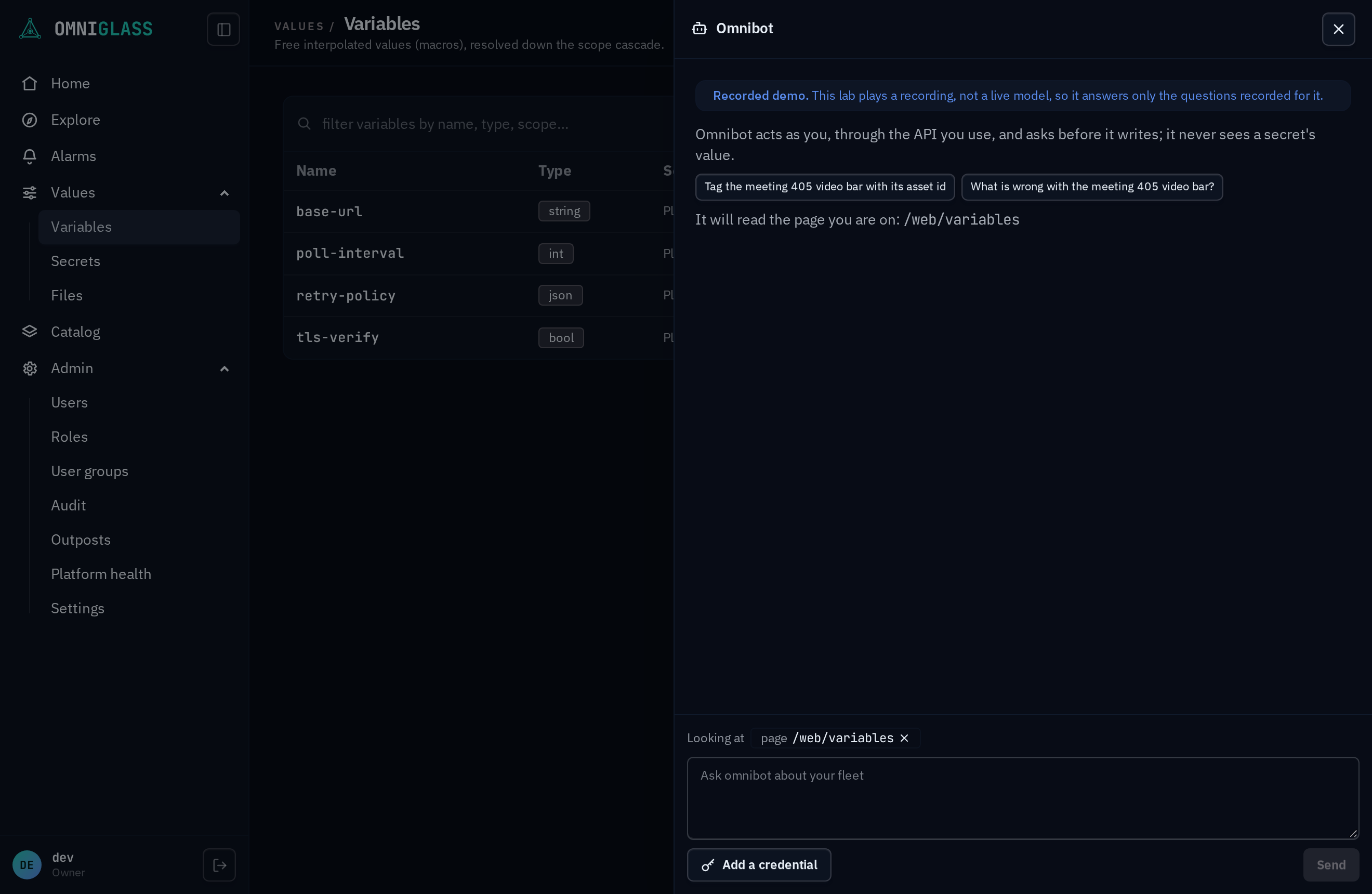
The panel shows omnibot’s work as it happens: its text, and a card for each tool call naming the tool and its arguments. A tool the console knows how to show reads the way the console shows that thing elsewhere: a component is a link to its page, reachability is each endpoint’s ladder. Any other tool, or a result that is not what its renderer reads, gets a plain card; the raw result is one click away under either. A call your agent policy asks about stops the run on a confirm card that names the call and lists the arguments it would run with, and its own card reads Waiting for you: Confirm runs it, Decline leaves it alone and omnibot hears why, and the card marks which. A destructive call says it cannot be undone. A run that reaches its step limit says so, and asking again carries on from there; one the server refuses (an agent or impersonation session cannot run omnibot) or that fails names the reason. A run whose connection closes before it finished says that it ended early, rather than looking busy for good; ask again to carry on.
A lab without a live model says so. The lab plays a recording, so the panel shows a Recorded demo note, and the questions the recording answers as chips: choosing one plays it to its answer. A question of your own gets the server’s reply, “This lab plays a recording; connect a model to ask your own question”, with the chips again, and no run. The recording’s write still waits on a confirm card, marked as part of the recording; Confirm runs it for real. With a model configured, none of this appears and any question is asked (#2443). The empty panel is a line on what omnibot does, those chips, and the page it will read.
Omnibot reads the page you are on. Every prompt carries the page as context, shown as a Looking at chip above the composer: its route and filters, and a system, location or component page by its name or address, never its uuid. It is read when you send, so a prompt sent after you move on carries the new page. It is a reference, never what the screen showed, so omnibot looks the page up itself and sees only what you may. Dismiss the chip to leave the page out of your next prompt; the one after carries it again (#2162).
Troubleshoot an alarm in one click. The bot button on an active alarm row runs the triage-alarm skill on that alarm, handed by its component and rule, never its message: the panel opens and omnibot reads the alarm, its component and its reachability before it says anything (#2164). The alarms guide has the rest.
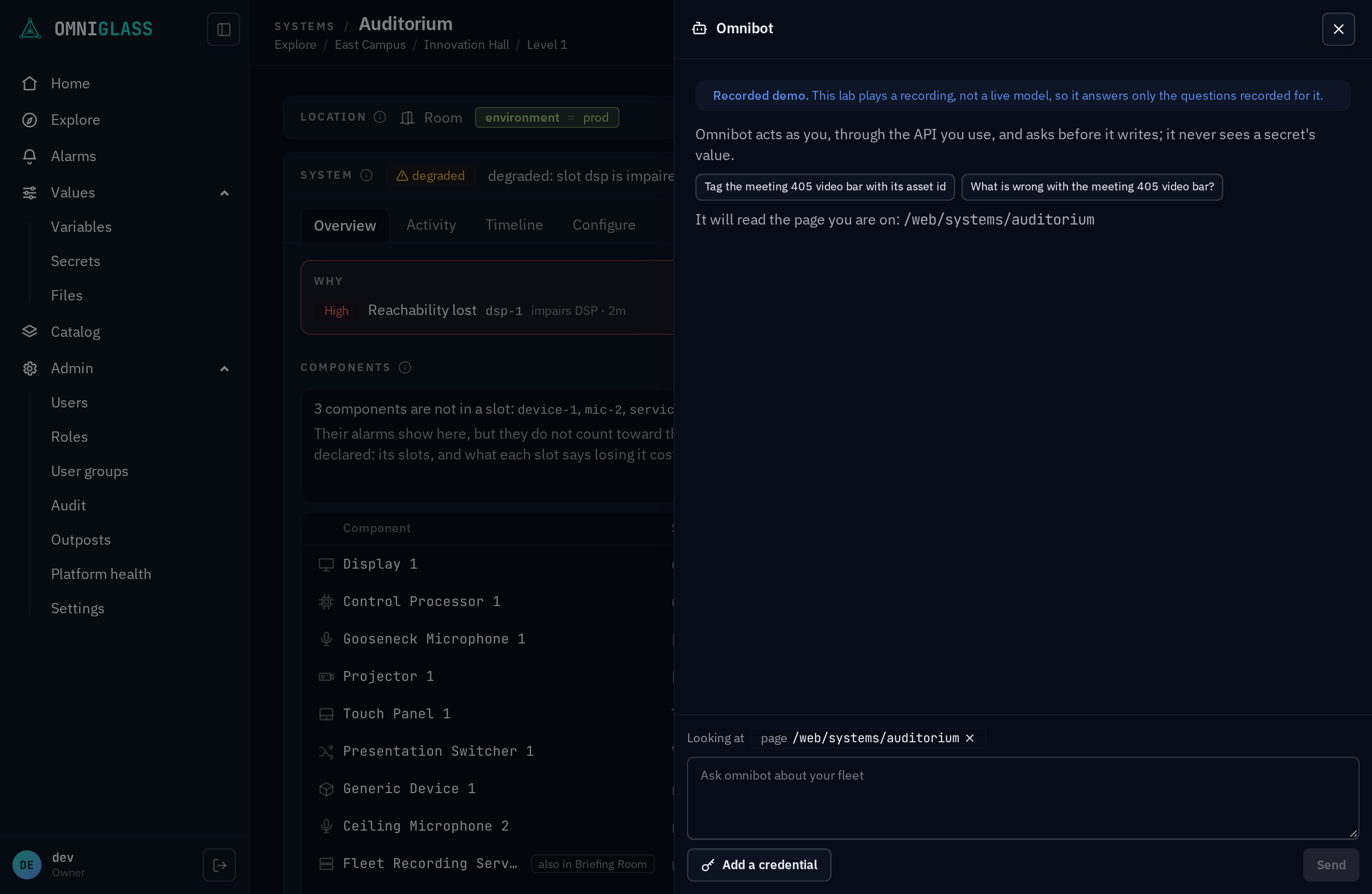
Add a credential is the console’s /secret: it creates the secret with your token through the
same form as Values > Secrets, and puts only secret <name> in your draft, so omnibot learns the
name and never the value.
What the agent may assume, and what it should ask
Section titled “What the agent may assume, and what it should ask”Every tool carries the MCP annotations, from one rule over its route’s method and gate: read-only tools change nothing, destructive ones overwrite, remove, or act on a component (issuing a command is one), and the rest add something. A well-behaved client runs the read-only tools freely and holds anything else for your confirmation; most clients do this by default, and you can tighten it in the client’s own permission settings, or an admin can set it for every agent (below).
What an agent may do
Section titled “What an agent may do”An admin sets, once for the install, what an agent may do in each class of operation, and the server enforces it. There are four classes, one per operation (the most sensitive wins), and the MCP tools reference prints each tool’s:
| Class | What it covers | Default |
|---|---|---|
read | a GET, or a POST gated on a read permission | always |
write | a POST that creates or acts | ask |
destructive | a PATCH, PUT or DELETE: overwriting or removing | ask |
credential_destination | any operation that may point a stored credential somewhere (gated on secret:bind) | ask |
Each class is always (run it), ask (run it, and the client confirms with its person first) or
never (the server refuses it with a 403, and the audit trail records an agent_refused row as the
agent’s). The defaults refuse nothing: an agent may do what its person may, and its client asks
before anything but a read. The policy governs an agent’s requests: any call with an agent token,
and any call over MCP whatever the token. Your own calls from the console or the CLI are untouched.
omniglass setting update agent --body '{"destructive":"never"}' # admin: no agent overwrites or deletesomniglass auth agent-policy | jq # the policy, and whether it governs this callerEvery tool the MCP server lists carries its class and the caller’s policy for it in its _meta, as
omniglass/agent_policy ({"class":"destructive","policy":"never"}), so a client can ask before an
ask tool and hide a never one. A never tool is still listed: the server refuses the call
whether or not the client hides it. Reading who you are and reading the policy itself are never
refused, so a refused agent can always learn why. And no agent may change the policy itself: patching
or restoring the agent settings, or restoring every setting, is refused to it whatever the classes
say, so only its person can loosen what binds it.
Narrowing it by role or by tool
Section titled “Narrowing it by role or by tool”The classes above are the install’s floor. Two narrower layers in the same agent settings sit on
top of it, and each can only make an agent’s policy stricter, never looser:
roles, keyed by role name, sets a class for the agents of anyone granted that role. An operator’s agent can be kept from writing while an owner’s agent is not.tools, keyed by operation ID (the MCP tool’s name), sets one operation, socreate-componentcan beneverwhile every other write staysask.
omniglass setting update agent --body '{"roles":{"operator":{"write":"never"}}}' # operators' agents: no writesomniglass setting update agent --body '{"tools":{"delete-component":"never"}}' # no agent deletes a componentomniglass setting update agent --body '{"roles":{"operator":null}}' # drop one overrideResolution is strictest wins (always, then ask, then never) across the class, every role
the person is granted (directly or through a group), and the tool. A role naming a looser value than
the class changes nothing, and so does a tool set to always under an ask class. An unknown role,
an unknown tool, or one of the two exempt reads is refused with a 422 when the override is written.
The resolved policy names the layer that set each value: omniglass auth agent-policy answers each
class with its source (platform, role, with the role it came from, or tool), plus a tools
list for each overridden operation. The 403 a refused agent gets says the same: that this tool, an
agent of this role, or this class is refused. In the console, the overrides edit as JSON on the
agent card of the Settings page: the text is the whole map, so deleting an entry from it and
saving drops that override, and blanking it drops them all.
Tools the agent can call
Section titled “Tools the agent can call”The catalog is curated: an operation is a tool only when it is stamped for MCP at its route, and the MCP tools reference is generated from those stamps. Beyond reading components, their endpoints, metrics and logs, it covers the triage loop:
- Find what is red.
list-alarmslists the active alarms across every component you can read, worst severity first (unacknowledgedfor the queue nobody has looked at,limitto cap it), so an agent does not walk the fleet one component at a time.list-component-alarms,list-system-alarmsandget-component-alarm-timelinenarrow it to one component or system, andlist-system-eventsreads what the event rules decided. - Act on an alarm.
acknowledge-component-alarm,snooze-component-alarmandunsnooze-component-alarm, each gated by its ownalarm:permission. - Read the rules behind it.
list-event-rule,get-event-rule,get-event-rule-state,preview-event-rule, the same four for calc rules,validate-expressionandlist-event-type. Writing a rule is not a tool. - Fix the component, its tags or its location.
update-component,list-component-tags,set-component-tag,remove-component-tagandeffective-tags;create-location,update-location,list-location-metricsandlist-location-properties;update-system,list-system-members,add-system-member,list-system-metrics,list-system-propertiesandlist-system-logs. This set adds no delete of a component, location, system or rule; the MCP tools reference marks every destructive tool the catalog serves. - See who did what.
list-audit-log, which still needs the admin permission it needs anywhere.
Some operations are never tools: any route that takes or returns a credential in plaintext (creating, updating, copying or revealing a secret, minting a token, logging in, setting a password, enrolling or claiming an outpost, a notification target’s URL). A credential a person must see goes to that person in the console or the CLI, never into an agent’s context, and the build fails if one of those routes is stamped. Running an endpoint’s poll now masks the endpoint’s own secrets wherever the device echoes them in the answer: a sample’s text, labels and identity, the faults, and a refusal’s text.
Seeing what it did
Section titled “Seeing what it did”An agent’s writes are yours in the audit trail, with how they arrived beside
them. In the console, Admin > Audit marks each with an mcp pill over its client and, for an agent
token, an agent <name> tag beside you; type channel:mcp to see only what came through an agent. An
admin reads the same from the CLI with:
omniglass audit-log list --channel mcp --limit 5 | jq '.events[] | {verb, actor_name, agent, client}'A row with "channel": "mcp" came from an MCP tool call, and client names the client the agent
declared itself as (asserted by the client, not verified), which --client claude matches by
substring.