

Manage users
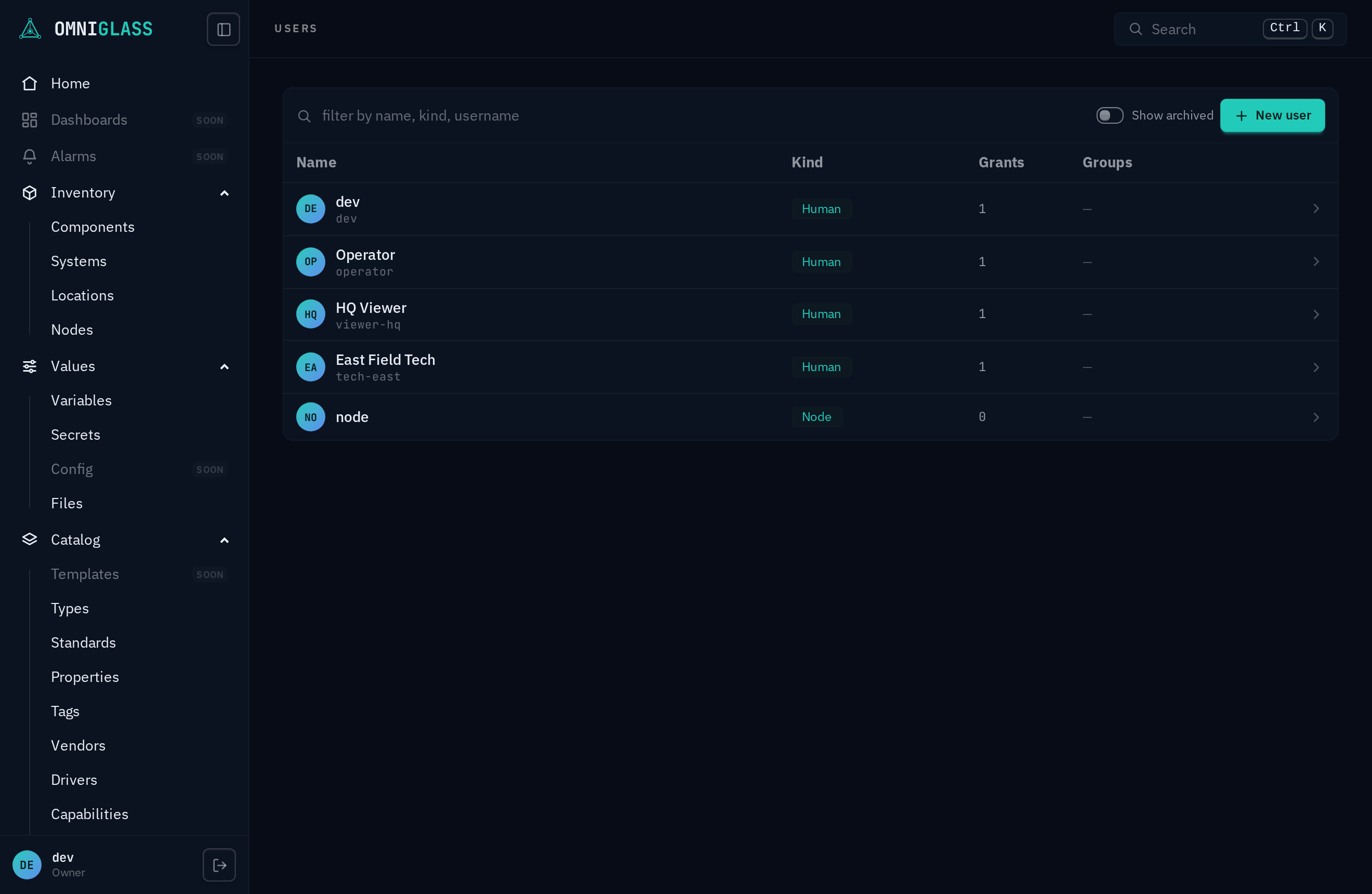
BuiltAdmin > Users is the admin directory of every user, persons and machine users, each with the roles granted to it. This page is the account lifecycle: creating, editing, disabling, and removing a user. Giving a user access, a role at a scope, is the grant builder on the next page. The model underneath is identity and access.
Every row leads with the user’s avatar, its uploaded picture when it has one and its
initials otherwise. You see the directory only if you hold user:read:admin, the
admin-tier read that a plain *:read cannot reach, so a viewer or field tech cannot enumerate
users. Because a user is not part of any location or system tree, that grant is inherently
all-scope: a location-scoped admin cannot list users.
-
Pick a row to open its blade: a user’s profile, the user groups it belongs to (open one to stack that group’s blade over the user), and its role grants (each a role at a scope).
-
With
user:create, New user creates a person with a username and an optional initial password (which must meet the password policy: at least 12 characters, not a common password, and not containing the username). Generate fills a strong random password, kept masked, with a Copy button to hand it over (or reveal it with the show/hide toggle). The new user can sign in right away and change that password themselves; a fresh account holds no grants (so it can sign in but do nothing) until you assign a role. The form validates as you type: a username is a lowercase handle (letters, digits, and. _ -, no capitals or spaces) and an email must be well formed, so an invalid field shows an inline error and blocks the submit before the round-trip (the same rules the server enforces). The same handle rule and inline check apply when you rename a user in edit mode. The new user’s blade opens directly in edit mode, so you assign its roles right away and one Save commits them. -
With
user:update, the footer Edit opens edit mode, where you change a user’s label, email, and username, or adjust its grants, and Save commits the lot; Disable / Enable sits in the footer’s left slot, available without entering edit. Renaming is safe: their credentials and grants follow the account (they key on an internal id, not the username), so a renamed user keeps their password and access. A username is a sign-in handle, not the identity triad’s name: a user carries no name column and is addressed by its uuid, which is why a username moves on the ordinary update rather than through the:renamecustom method a component, system, location, or group is renamed by. Only an administrator can change a username; the user cannot change their own. -
A user has a lifecycle in the blade footer, escalating from reversible to permanent, and reads pause to remove to destroy. The left slot is the reversible toggle: Disable (
user:update) suspends sign-in (the row reads inactive), Enable restores it. The kebab holds the stronger, red steps: Archive (user:archive) soft-deletes a user (hidden from the directory, cannot sign in, reversibly), and Purge (user:purge:admin, admin-sensitive so admin and owner only) permanently deletes an archived user and its grants and memberships, with a confirm. The audit trail is kept through a purge. An archived user shows Restore in the left slot; the Show archived toggle above the directory surfaces hidden accounts so you can re-find one to restore or purge. The last active owner cannot be disabled or archived, the same invariant that protects the last owner grant. -
With
user:reset-password, the kebab on another user’s blade holds Reset password: it opens an inline panel with a password field (the same Generate and inline policy check as the New user form) and sets a new password for that user without their current one. The reset immediately signs the user out of every session (its API tokens are kept, a token not being tied to the password), so it cuts off a compromised or departing account’s logins at once. The set password stays copyable so you can hand it over; the user changes it after signing in. The reset is audited with you as the actor. It is refused on your own account (change your own password from Your profile, which verifies your current one) and on an owner (owners cannot be reset by anyone). This is a console path for what the CLI does withomniglass set-password; unlike that trusted direct-DB lane, the console reset enforces the password policy and the takeover guard. -
With
user:set-avatar(an all-scope capability), a user’s Edit blade gains an Upload / Remove picture panel: Upload sets that user’s profile picture from an image file (JPEG, PNG, or WebP, normalized server-side to a small square), Remove clears it, and the change is audited with you as the actor. Without the capability the panel does not render, though the user’s picture still shows in the blade header and the directory. This is a console path foromniglass user setAvatar alice/removeAvatar aliceon the CLI. -
With
user:revoke-session, another user’s blade gains Sessions and API tokens sections: every credential the account holds, listed with itsogp_locator, the device and address that created it, when it was last active, its expiry, and a token’s description. Revoke any one, or use Revoke all sessions / Revoke all tokens in the blade’s kebab, to cut off a lost laptop or a leaked token without resetting the account. The revoke is audited with you as the actor. As with the password reset, an owner’s credentials cannot be revoked by anyone: their list renders read-only (you can see where the account is signed in, not end it), and the affordance is hidden unless you hold the capability. -
With
user:link-identity(all-scope, held by admin and owner), a person’s blade gains a Single sign-on section: the identities at the identity provider the person signs in through, each shown as its subject and issuer with who made the link and when it was last used. Type an identity asiss|sub(the provider’s issuer URL exactly as its tokens carry it, a bar, and the person’s subject there) and Link; the subject is in the provider’s admin console, and an unlinked sign-in names the whole identifier in the server’s log (thesso: sign-in refusedline, codeunlinked, itsidentity), never on the sign-in page, where the person reads only that it is not linked. An email address is refused: email never links, since a matching address at a provider is not proof of the person. Unlink removes one and ends every session and token the person signed in through it. Linking is a way to sign in as the target, so it takes the same takeover guard as a password reset: refused on yourself (link your own from Your profile, which confirms your password), on an owner (an owner links their own; the list renders read-only), and on anyone whose capabilities exceed yours. Every link and unlink is audited with you as the actor, and the link records who made it: when a person is later granted owner, directly or through a group, every link someone else made for them is deleted (audited) and they link again themselves. An identity is linked to one person only (a second link of the same identity is refused). Connecting the provider itself is single sign-on.
From the CLI the same surface is omniglass user list / get / create / update /
disable / enable / archive / restore / purge, plus user session list alice /
user session revoke alice <session-id> / user session revokeAll alice, and
user identity-link list alice / create alice --identifier '<iss>|<sub>' / delete alice <link-id> (see the
CLI reference).