

Roles, groups, and grants
PartialAccess is a grant: a role at a scope. You assign a grant to a user directly, or to a group the user belongs to; the scope decides which slice of the fleet the grant reaches. This page is the three parts of that: the roles you can assign, the groups that share a grant across a team, and the grant builder that stages and commits both. The model underneath is identity and access.
Admin > Roles (with role:read:admin) is the catalog of the built-in roles on the same list surface as Users
and User groups: a directory row per role (its name, whether it is official, what it inherits, and how many
permissions it confers), ordered least to most powerful (viewer, operator, deploy, admin, owner). Open a row for
its read-only blade, which shows the role’s permissions as a net view against the full set of
capabilities the platform enforces (the permission universe). A Held / Missing / All toggle switches
between the permissions the role holds, the ones it is missing, and the whole universe with each lit or
dimmed, listed one per line in alphabetical order. Held is resolved the same way the role acts at runtime
(inheritance, wildcards, and the read floor applied), so viewer holds only the reads it can reach (no
secret:read, no admin-tier reads), admin holds nearly everything, owner holds all of it, and an
admin-sensitive permission like audit:read:admin is tinted for its :admin tier. It is a teaching surface: it
renders the real seeded roles against the real routed capabilities, not a static table. Today the built-in
roles are read-only.
The same matrix, rendered here from the seed itself (make gen) with inheritance, wildcards, and
the read floor resolved exactly as the authorizer resolves them at runtime:
Viewer (viewer ): Read-only access to everything, and subscribing yourself to the alarms you can see. The floor every other role inherits.
Effective permissions (3):
*:readnotification:subscribeassistant:use
Operator (operator inherits viewer): Day-to-day operations: create or edit components, endpoints (retry an endpoint's rejected session, or run its poll now), secrets, variables, the property, metric, event, command and notification catalogs, issue commands in scope, preview a driver spec through an outpost, and impair simulated components. Sees, reveals and binds the device secrets in its scope (never the admin-sensitive platform credentials). Inherits Viewer.
Effective permissions (37):
component:createcomponent:updatecomponent:renamecomponent:moveendpoint:createendpoint:updateendpoint:retryendpoint:rundriver:previewsecret:readsecret:revealsecret:bindsecret:createsecret:updatevariable:createvariable:updateproperty_type:createproperty_type:updatemetric_type:createmetric_type:updateevent_type:createevent_type:updatecommand_type:createcommand_type:updatenotification_type:createnotification_type:updatecommand:issuesimulation:updatealarm:acknowledgealarm:snoozenotification:retrytelemetry:pushfile:createfile:delete*:readnotification:subscribeassistant:use
Deploy (deploy inherits viewer): Integrator or field tech: create, update, rename, and move on locations, systems, and components, and no delete. Granted at a location with the "under only" operator, it builds out and edits the rooms under that location, never the location itself, plus the secrets those locations own. The same grant reads the systems and components placed in that location and creates new ones there, but does not edit, rename, or move them: that takes a system-scoped or component-scoped grant of this role, until a location grant's scope spans the modify actions too. Inherits Viewer, whose read floor is scoped the same way.
Effective permissions (21):
location:createlocation:updatelocation:renamelocation:movesystem:createsystem:updatesystem:renamesystem:movecomponent:createcomponent:updatecomponent:renamecomponent:movesecret:readsecret:revealsecret:bindsecret:createsecret:updatefile:create*:readnotification:subscribeassistant:use
Administrator (admin inherits operator): Manages the fleet, users, roles, and grants: full create, update, and delete on locations, systems, and components, and on users, credentials, grants, and roles. Deliberately NOT the superuser: it cannot grant a role above its own tier, so it cannot make itself owner. Inherits Operator.
Effective permissions (101):
component:deleteendpoint:*task:*system:createsystem:updatesystem:deletesystem:renamesystem:movelocation:createlocation:updatelocation:deletelocation:renamelocation:moveuser:*user:read:adminuser:purge:adminsecret:>file:>variable:*platform:*settings:readsettings:updateuser_grant:*user_group:*user_group:read:adminoutpost:*role:read:adminaudit:read:adminproperty_type:*metric_type:*event_type:*severity_level:*rule:*command_type:*notification_type:*notification_target:*command:*location_type:createlocation_type:updatelocation_type:deletelocation_type:renamecomponent_type:createcomponent_type:updatecomponent_type:deletesystem_type:createsystem_type:updatesystem_type:deletevendor:createvendor:updatevendor:deletevendor:renamedriver:createdriver:updatedriver:deletedriver:renameproduct:createproduct:updateproduct:deleteproduct:renamestandard:createstandard:updatestandard:deletestandard:renametag:*component:createcomponent:updatecomponent:renamecomponent:moveendpoint:createendpoint:updateendpoint:retryendpoint:rundriver:previewsecret:readsecret:revealsecret:bindsecret:createsecret:updatevariable:createvariable:updateproperty_type:createproperty_type:updatemetric_type:createmetric_type:updateevent_type:createevent_type:updatecommand_type:createcommand_type:updatenotification_type:createnotification_type:updatecommand:issuesimulation:updatealarm:acknowledgealarm:snoozenotification:retrytelemetry:pushfile:createfile:delete*:readnotification:subscribeassistant:use
Owner (owner ): Full control of everything, the break-glass superuser (the tail wildcard, so it covers every capability at every tier, including admin-sensitive ones and future resources). At least one active owner always exists, and an owner account cannot be impersonated.
Effective permissions (1):
>
User groups
Section titled “User groups”Admin > User groups (with user_group:read:admin) is the admin surface for user groups: a group holds
role @ scope grants, and every member inherits them, so you assign access to a team once instead of per
user. Pick a row to open the group’s blade: its members (add any user, remove one, or open a member to
stack that user’s blade over the group) and its grants, built with the same grant builder the user detail uses. A grant added to the group takes effect for every member
immediately, and is bounded by the same rule as a direct grant (you cannot grant a role above your own tier).
New user group creates one (name, label, description); the name is an ordinary entity name
(lowercase letters, digits, and hyphens, no dots and no underscores), while the label is free
text. The name is not patchable once the group exists: moving it is POST /user-groups/{group}:rename,
gated by user_group:rename rather than :update (ADR-0077), and the
console’s group blade shows the name read-only. The new group then opens
directly in edit mode, so you add its members and grants right away and one Save commits them (they
are attached to the group once it exists, so creating and populating stay one flow). Deleting a group drops
the memberships and the inherited grants, but members keep their own direct grants.
On a user’s detail, grants split into two: the ones you granted the user directly (editable in the grant
builder) and the ones inherited from a user group (shown read-only, tagged from <group>), so it is always clear
where a user’s access comes from. To change an inherited grant, edit the group, not the user.
From the CLI the surface is omniglass user-group list / get / create / update / rename /
delete, plus its
member, grant and identity provider mapping subcommands (see the CLI reference).
Identity provider groups
Section titled “Identity provider groups”When people sign in with single sign-on, the groups they
already keep at the identity provider can decide their Omniglass groups, so a building’s support team
in Entra ID or Okta gets exactly the grants of its Omniglass group without anyone adding members by hand.
In a group’s blade, Edit opens Identity provider groups: type a value of the provider’s groups
claim (the claim the sso setting groups_claim names, groups by default), press Add, and
Save. The mapping is keyed by the provider’s issuer, which the console fills in from the configured
provider (the API’s POST /user-groups/{group}/idp-mappings takes an issuer as well). Several values
may map to one group, and one value to several groups.
What happens next, and when:
- At each SSO sign-in, in the transaction that signs the person in, their memberships from that provider are set to exactly the groups their token’s claim values map to: a newly mapped group is joined, a group no value maps to any more is left. A token with no groups claim at all counts as no groups (fail closed), so a provider that stops sending the claim removes these memberships rather than freezing them.
- At each re-check (every
recheck_minutes, 15 by default), the refresh the sweep redeems usually answers with a fresh id_token; when that token carries the groups claim, the same sync runs on it, so a group removed at the provider lands at the first re-check whose token reflects it. How quickly a provider’s tokens reflect a group change is the provider’s: Entra ID can take up to a day. - Removing a group’s last mapping from a provider removes, at once, every membership that provider brought into the group, since nothing can justify them any more. Removing one of several mappings waits for each person’s next sign-in or re-check.
The group’s Members list shows which members single sign-on brought: they read from SSO with the provider’s host. Those are the only rows the sync ever touches. A member you add by hand is a local membership and stays whatever the provider says, and a local membership in a mapped group stands in for the provider’s, so nothing is added twice. Adding by hand a member the provider brought makes that row local: it stops following the provider. Removing one the provider brought lasts only until the person’s next sign-in or re-check while a mapping still puts them there; to keep someone out, change their groups at the provider or remove the mapping.
No provider group reaches an owner. A group that carries an owner grant at any scope cannot be
mapped, and a mapped group cannot be given an owner grant: both are refused with a 409. Owner stays
a grant an owner makes, never one the provider’s administrators can hand out
(ADR-2361).
Every add and remove the sync makes is in the audit log as a user_group_member change with
source: idp and the issuer; a mapping’s create and delete are user_group_idp_mapping rows.
The grant builder
Section titled “The grant builder”Users and User groups share one control for assigning access. With user_grant:create / :delete, the
detail panel’s grant builder stages a set of changes and applies them only on Save, so there are no
accidental edits.
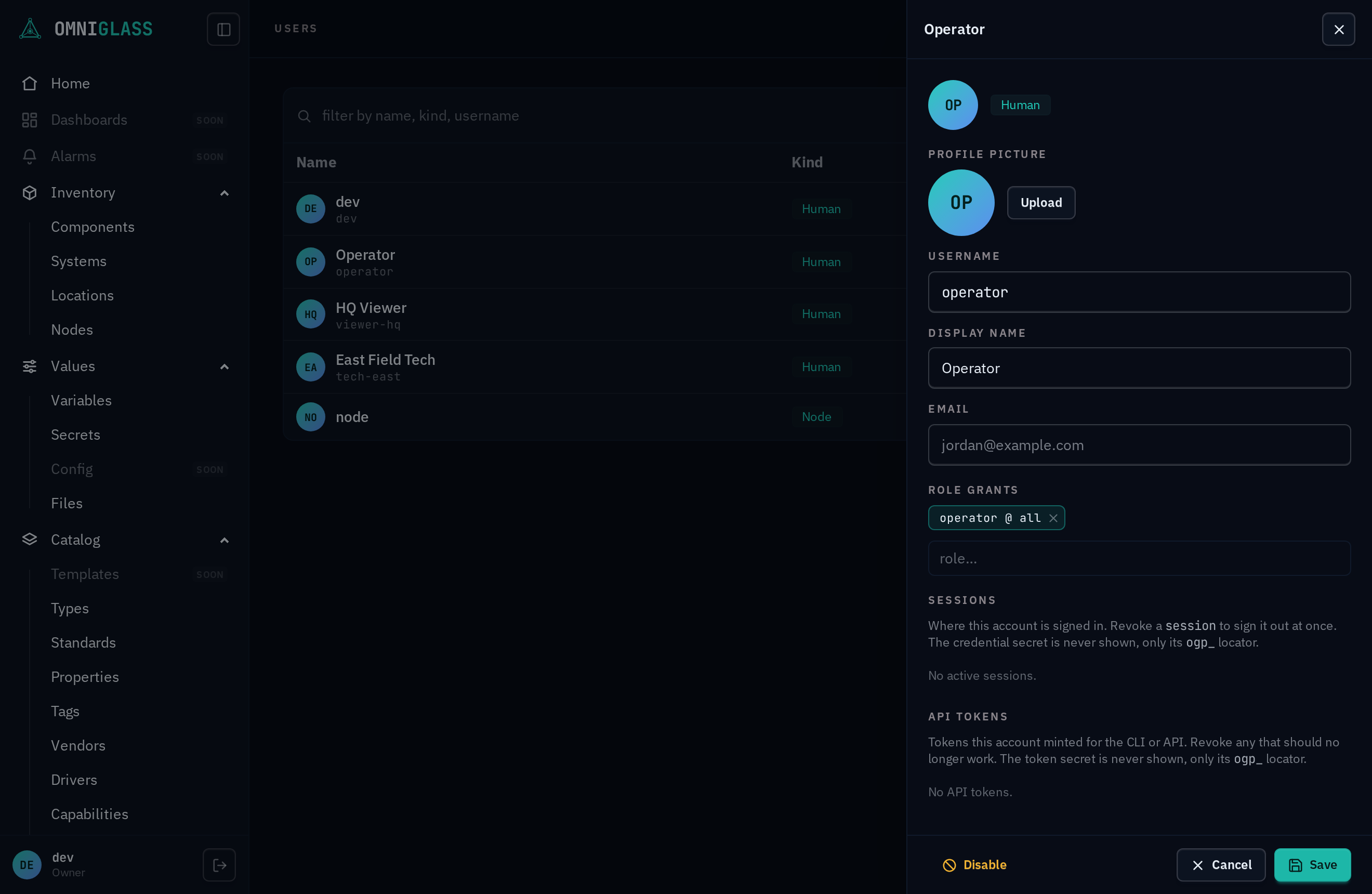
Type a role, then Tab
or Enter to the scope kind, then (for a non-all scope) the specific location, system, or
component from an indented tree, then the operator that says how that entity matches the tree:
each commit becomes a role @ operator scope chip. The operator is one of at or under (≥,
the entity and everything beneath it, the default), under only (>, the descendants but not
the entity itself, for update and delete), or just this (=, exactly the one entity, no
descendants and no adding children under it), so you can grant a field tech the rooms inside a
building without letting them rename the building, or lock an operator to a single outpost. A scope
kind reaches its own tier only, so a field tech who also works the systems and components in that
building needs a grant on each of those tiers beside the location one. Removing an existing grant marks it (dimmed and
struck, undoable), staging a new one shows it in green, and a pending-diff line (“+N to grant, -M
to revoke”) previews exactly what Save will do. A
scope targets the entity by its internal id, so a grant survives a rename of that entity. One rule
the server always holds: the last owner grant cannot be revoked, so the platform can never be
locked out of administration.
Hovering a role in the picker shows its description and the permissions it grants, so you can see what you are assigning before you stage it.
From the CLI a direct grant is omniglass user grant create alice --role viewer --scope-kind location --scope-id boi.17c (the user by username or machine user name, the scope root by name or dotted address) / omniglass user grant delete alice <grantId>; a grant has no name, so it alone is addressed by its uuid.